We're here to help
If you have a question, a problem, or an idea for ZipClips, email us and a real person will get back to you. Our email is: contact@getzipclips.com
Delete your ZipClips Account
You can delete your ZipClips account at any time. Deleting your account is permanent and cannot be undone.
Delete from inside the app
1. Open ZipClips and go to Settings → Account.
2. Tap Delete Account.
3. You'll see a summary of what will be removed — how many photos you've shared, and which groups you're in.
4. Type DELETE to confirm.
Your account and data are removed right away, and you'll be signed out.
If you can't open the app
If you've lost access to your phone or can't sign in, email contact@getzipclips.com from the email address on your ZipClips account and ask us to delete your account. We'll confirm it's you and take care of it.
What gets deleted
Everything tied to your account is permanently removed:
- Every photo and video you shared, including the files themselves
- Every voice note you recorded, including the audio files
- Every comment you left
- Your activity history
- Your membership in every share group
- Your profile
- Your login
What happens to groups you created
If you created a group that other people are still in, the group itself stays so the other members don't lose it — it's handed over to another member. Your photos and voice notes are still removed from it. If you were the only person left in a group, that group is deleted with your account.
How long it takes
Your account and your content are removed from the app right away. Everything is permanently deleted from our servers within 30 days, except anything we're required to keep for legal or dispute-resolution reasons. If you'd like a copy of your photos and voice notes before they're deleted, email us and ask before you delete your account.
SMS Marketing
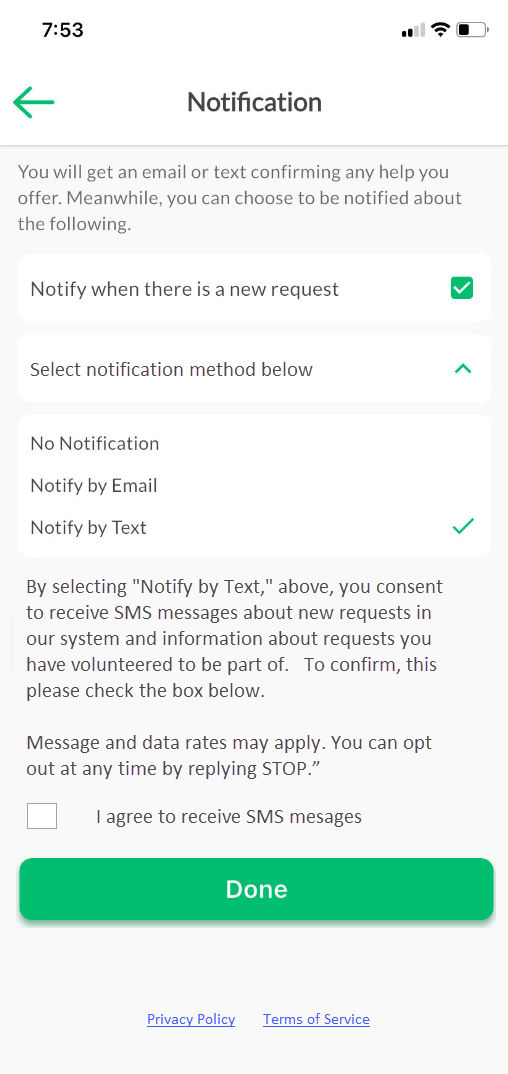
Once you join ZipClips, you can set your preferences for receiving alerts regarding new help tickets, status changes, or details on tasks you have accepted. You have total control over whether you receive these notifications and which specific updates you want to follow.
Alerts can be delivered through email or SMS. If you prefer mobile notifications, you must simply tick the verification box to grant your official consent for receiving text messages from us. Please refer to the graphic below to see how to toggle between email, text, or no alerts, as well as the specific box required to authorize SMS communication. If you wish to cancel mobile alerts, adjust your profile in the app or text STOP to unsubscribe. Standard data and messaging fees from your carrier may apply depending on your plan.